filebeat 合并多行日志的问题
配置说明
最近有些日志需要进行多行合并收集,就开始研究 filebeat 的多行配置,期间遇到个问题。对 filebeat 配置熟悉的同学可以直接跳到下面的 问题 环节。
使用版本:
filebeat version 6.1.4 (amd64), libbeat 6.1.4
官方文档:
https://www.elastic.co/guide/en/beats/filebeat/6.1/multiline-examples.html
https://www.elastic.co/guide/en/beats/filebeat/6.1/configuration-filebeat-options.html
下面列出几个重要的参数:
include_lines
If multiline is also specified, each multiline message is combined into a single line before the lines are filtered by
include_lines.A list of regular expressions to match the lines that you want Filebeat to include. Filebeat exports only the lines that match a regular expression in the list. By default, all lines are exported.
If multiline is also specified, each multiline message is combined into a single line before the lines are filtered by
include_lines.The following example configuresFilebeat to export any lines that start with "ERR" or "WARN":
xxxxxxxxxx41filebeat.prospectors2paths3/var/log/myapp/*.log4 include_lines'^ERR' '^WARN'恶魔的低语:符合列表中任意一个正则的就会被收集。
multiline.pattern
Specifies the regular expression pattern to match. Note that the regexp patterns supported by Filebeat differ somewhat from the patterns supported by Logstash. See Regular expression support for a list of supported regexp patterns. Depending on how you configure other multiline options, lines that match the specified regular expression are considered either continuations of a previous line or the start of a new multiline event. You can set the
negateoption to negate the pattern.
恶魔的低语:符合此正则的行,将进行多行合并,合并规则取决于下面的两个参数
multiline.max_lines
The maximum number of lines that can be combined into one event. If the multiline message contains more than
max_lines, any additional lines are discarded. The default is 500.
恶魔的低语:可合并的最大行数,超过则被忽略,默认为 500,避免合并过多日志
multiline.timeout
After the specified timeout, Filebeat sends the multiline event even if no new pattern is found to start a new event. The default is 5s.
恶魔的低语:多行匹配超时时间,超过此时间后的当前多行匹配事件将停止并发送,然后开始一个新的多行匹配事件,默认5秒
multiline.negate
Defines whether the pattern is negated. The default is
false.
恶魔的低语:看下面结合 match 的分析
multiline.match
Specifies how Filebeat combines matching lines into an event. The settings are
afterorbefore. The behavior of these settings depends on what you specify fornegate:
Setting for negate | Setting for match | Result | Example pattern: ^b |
|---|---|---|---|
false | after | Consecutive lines that match the pattern are appended to the previous line that doesn’t match. | 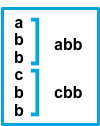 |
false | before | Consecutive lines that match the pattern are prepended to the next line that doesn’t match. | 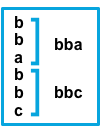 |
true | after | Consecutive lines that don’t match the pattern are appended to the previous line that does match. | 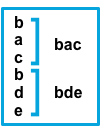 |
true | before | Consecutive lines that don’t match the pattern are prepended to the next line that does match. | 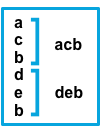 |
恶魔的低语:我第一次看上面的 multiline 相关设置的时候,真的被搞懵逼了。
下面是自己对 multiline.match 的一个总结(顺序同上图):
第一种:
negate:
falsematch:
after将符合正则的行,与前一个不符合正则的行合并为一行。
xxxxxxxxxx31不匹配pattern的行2匹配pattern的行3匹配pattern的行
第二种:
negate:
falsematch:
before将符合正则的行,与后面一个不符合正则的行合并为一行。
xxxxxxxxxx31匹配pattern的行2匹配pattern的行3不匹配pattern的行
第三种:
negate:
truematch:
after将不符合正则的行,与前一个符合正则的行合并为一行。
xxxxxxxxxx31匹配pattern的行2不匹配pattern的行3不匹配pattern的行
第四种:
negate:
truematch:
before将不符合正则的行,与后一个符合正则的行合并为一行。
xxxxxxxxxx31不匹配pattern的行2不匹配pattern的行3匹配pattern的行
问题
include_lines 与 multiline.pattern 一同使用时,与预期产生的效果不同。以下列举了3个实例,请关注下 期望收集结果 和 实际收集结果 的差别。
include_lines 官方文档中有一条:
If multiline is also specified, each multiline message is combined into a single line before the lines are filtered by
include_lines.
我的理解:
include_lines与multiline.pattern一同使用时,程序先把符合multiline.pattern的行,按规则进行合并,再由include_lines过滤,得到一行。- 只符合
include_lines正则的行会以单一行进行收集。
filebeat.yml 文件配置(无其他配置):
xxxxxxxxxx121filebeat.prospectors:2- type: log3 enabled: true4 paths:5 - /var/log/i.log6 include_lines: ['error']7 multiline.pattern: "errorA"8 multiline.negate: true9 multiline.match: after10output.file:11 path: "/var/log"12 filename: o.log输入样本1
xxxxxxxxxx81echo 'A2B3C4errorA TEST15162738' >>/var/log/i.log期望收集结果
xxxxxxxxxx41errorA TEST1213243实际收集结果
xxxxxxxxxx41errorA TEST1213243源数据
xxxxxxxxxx11{"@timestamp":"2019-06-04T10:21:37.332Z","@metadata":{"beat":"filebeat","type":"doc","version":"6.1.4"},"beat":{"name":"localhost.localdomain","hostname":"localhost.localdomain","version":"6.1.4"},"source":"/var/log/i.log","offset":26,"message":"errorA TEST1\n1\n2\n3\n","prospector":{"type":"log"}}预测结果
正确
输入样本2
xxxxxxxxxx81echo 'A2B3C4error TEST25162738' >>/var/log/i.log期望收集结果
xxxxxxxxxx11error TEST2实际收集结果
xxxxxxxxxx71A2B3C4error TEST2516273源数据
xxxxxxxxxx11{"@timestamp":"2019-06-04T10:22:22.336Z","@metadata":{"beat":"filebeat","type":"doc","version":"6.1.4"},"message":"A\nB\nC\nerror TEST2\n1\n2\n3\n","source":"/var/log/i.log","offset":51,"prospector":{"type":"log"},"beat":{"name":"localhost.localdomain","hostname":"localhost.localdomain","version":"6.1.4"}}预测结果
错误
输入样本3
xxxxxxxxxx51echo 'error TEST32error TEST33error TEST34error TEST35' >>/var/log/i.log期望收集结果
4条
xxxxxxxxxx11error TEST3xxxxxxxxxx11error TEST3xxxxxxxxxx11error TEST3xxxxxxxxxx11error TEST3实际收集结果
1条
xxxxxxxxxx41error TEST32error TEST33error TEST34error TEST3源数据
xxxxxxxxxx11{"@timestamp":"2019-06-04T10:23:37.342Z","@metadata":{"beat":"filebeat","type":"doc","version":"6.1.4"},"prospector":{"type":"log"},"beat":{"name":"localhost.localdomain","hostname":"localhost.localdomain","version":"6.1.4"},"source":"/var/log/i.log","offset":112,"message":"error TEST3\nerror TEST3\nerror TEST3\nerror TEST3\nerror TEST3\n"}预测结果
错误
结论
include_lines与multiline.pattern一同使用时,程序先把符合multiline.pattern的行,按规则进行合并,再由include_lines过滤,得到一行。- 只符合
include_lines的行也会进行多行合并,它会与前后行都进行合并(无视negate和match规则),得到一行。 - 若没有设置
include_lines,除了multiline.pattern会被优先合并外,其他所有行都将被合并为一行(等效于设置了: include_lines: ['.*'])。
恶魔的低语: 这样造成很多不必要的多余内容收集,有什么办法吗?分成两个配置?